
刚刚接触RFdiffusion3时,很多朋友可能都会感到一时无从下手。相比初代RFdiffusion,新版本的上手难度明显增加了——曾经针对每个设计任务都提供了清晰的示例,我们只需稍作修改就能直接使用;而现在,情况变得复杂了许多。
即便我们认真读完了RFD3文件夹下的说明文档,成功生成了蛋白质骨架,准备进入下一步的MPNN序列设计时,却会发现MPNN的文档赫然写着:“Detailed documentation coming soon!”,瞬间让人感到进退两难。
转向根目录examples文件夹下的all.ipynb示例文件,虽然安装后能够顺利运行,但其中参数繁多、令人眼花缭乱,新手很难快速抓住重点。更让人困惑的是,即使成功运行,也常常发现RFD3生成的结构与MPNN设计的序列对不上,而如何将RFD3、MPNN和RF3三个模块串联起来,对于小白来说也是相当困难。
在这篇文章中,我将结合自己实际使用中遇到的问题、摸索出的解决方案,与大家系统梳理代码逻辑、解读关键参数,并一步步演示如何将这三个强大的工具无缝衔接,手把手带你玩转RFD3。(最后一部分是构建的自动化流程)
下面这份 JSON 展示了 两个并行的蛋白设计任务,分别针对 胰岛素受体(InsulinR) 和 PD-L1,核心思路是:
利用已知受体结构中的关键相互作用原子(hotspots),引导模型生成新的结合蛋白 scaffold。
{"insulinr": {"dialect": 2,"infer_ori_strategy": "hotspots","input": "input_pdbs/4zxb_cropped.pdb","contig": "40-120,/0,E6-155","select_hotspots": {"E64": "CD2,CZ","E88": "CG,CZ","E96": "CD1,CZ"},"is_non_loopy": true},"pdl1": {"dialect": 2,"infer_ori_strategy": "hotspots","input": "input_pdbs/5o45_cropped.pdb","contig": "50-120,/0,A17-131","select_hotspots": {"A56": "CG,OH","A115": "CG,SD","A123": "CD2,OH"},"is_non_loopy": true}}
1、整体架构与设计逻辑
配置采用双任务独立并行结构:
{"insulinr": { ... }, // 胰岛素受体结合剂设计"pdl1": { ... } // PDL1 结合剂设计}
insulinr和pdl1是两个 独立的 InputSpecification每个 key 对应 一次完整、互不影响的设计任务
RFdiffusion3 会分别对它们进行采样与生成
2、全局通用参数详解
所有设计任务共享以下核心参数:
1. 配置语法版本 (dialect: 2)
功能:启用 RFdiffusion3 新一代配置语法
建议:所有新项目统一使用版本 2
注意:旧版 RFdiffusion 配置可使用 1(不推荐)
2. 空间朝向推断策略 (infer_ori_strategy: "hotspots")
功能:基于热点原子自动推断 scaffold 空间朝向
工作原理:模型依据指定的 hotspot 原子,智能推断生成蛋白应如何空间定位,确保与受体形成有效相互作用界面
最佳场景:已知关键接触残基但未知完整结构的蛋白-蛋白结合剂设计
设计优势:生成 scaffold 会主动贴合热点区域,形成稳定的结合界面
3. 结构规则化参数 (is_non_loopy: true)
功能:抑制无序 loop 结构,倾向生成规则二级结构
结构影响:
显著减少长而无序的 loop 区域
倾向生成更多 α-螺旋/β-折叠
提升蛋白的可设计性与可表达性
强烈建议:在所有 binder/scaffold 设计中启用此选项
3、胰岛素受体结合剂设计实例(insulinr)
1). 受体结构输入 (input)
文件说明:使用裁剪后的胰岛素受体结构 (
4zxb_cropped.pdb)预处理细节:裁剪保留了受体关键结构域和与结合相关的区域
设计目的:减少不必要的计算复杂度,聚焦关键相互作用界面
2). 结构组成定义 (contig)
完整字符串 "40-120,/0,E6-155" 分解为三个部分:
40-120:生成长度在 40–120 个氨基酸的新蛋白目的:确保 binder/scaffold 有足够大小形成稳定结合界面
/0:链断开符号功能:明确区分生成蛋白与受体链
作用:在结构生成中建立明确的链分离
E6-155:固定输入结构中 E 链的第 6–155 位残基作用:作为“受体”部分,结构和序列保持不变
意义:提供稳定的对接骨架
设计模式:这是一个典型的 "新生蛋白 + 固定受体" 结合剂设计模式。
3). 关键相互作用热点 (select_hotspots)
定义了受体上最重要、最希望被新蛋白接触的原子,可以通过pymol来实现(切换到atom模式):
E64: CD2, CZ – 芳香环/疏水核心原子
E88: CG, CZ – 疏水侧链关键原子
E96: CD1, CZ – 芳香环重要接触点
选择原则:
残基定位:所有热点均位于受体 E 链的关键功能区域
原子特异性:精确到侧链关键原子,确保相互作用的化学特异性
化学特性:多为芳香环原子或疏水核心原子,适合形成 π-π 堆积或疏水相互作用
模型响应:RFdiffusion3 在生成 scaffold 时会优先靠近这些原子,围绕它们形成稳定的相互作用界面。
二、RFD3骨架生成
from lightning.fabric import seed_everythingfrom rfd3.engine import RFD3InferenceConfig, RFD3InferenceEnginefrom atomworks.io.utils.visualize import view# Set seed for reproducibilityseed_everything(0)config = RFD3InferenceConfig(diffusion_batch_size=2 # Generate 2 structures per batch)# Initialize engine and run generationmodel = RFD3InferenceEngine(**config)outputs = model.run(inputs='protein_binder_design.json', # None for unconditional generationout_dir=None, # None to return in memory (no file output)n_batches=2, # Generate 1 batch)# 可以打印出来看看设计了多少骨架for idx, data in outputs.items():print(f"Batch {idx}: {len(data)} structure(s)")print(f" Output type: {type(data[0]).__name__}")
Batch protein_binder_design_insulinr_0: 2 structure(s)Output type: RFD3OutputBatch protein_binder_design_insulinr_1: 2 structure(s)Output type: RFD3Output
# Extract the first generated backbone for downstream use#第一个batchfirst_key = next(iter(outputs.keys()))# 第一个batch中的第一个骨架atom_array = outputs[first_key][0].atom_array
from mpnn.inference_engines.mpnn import MPNNInferenceEngine# Configure MPNN inference engine# See mpnn.utils.inference.MPNN_GLOBAL_INFERENCE_DEFAULTS for all optionsengine_config = {"model_type": "ligand_mpnn", # or "protein_mpnn" for vanilla ProteinMPNN"is_legacy_weights": True, # Required for now for ligand_mpnn and protein_mpnn"out_directory": None, # Return results in memory"write_structures": False,"write_fasta": False,}# Configure per-input inference options# See mpnn.utils.inference.MPNN_PER_INPUT_INFERENCE_DEFAULTS for all optionsinput_configs = [{"batch_size": 10, # Generate 10 sequences per structure"remove_waters": True,"fixed_chains":['B'] #固定住受体,让其不发生改变}]# Run sequence design on the RFD3-generated backbonemodel = MPNNInferenceEngine(**engine_config)mpnn_outputs = model.run(input_dicts=input_configs, atom_arrays=[atom_array])
from biotite.structure import get_residue_startsfrom biotite.sequence import ProteinSequence# Extract and display the designed sequencesprint(f"Generated {len(mpnn_outputs)} designed sequences:\n")for i, item in enumerate(mpnn_outputs):res_starts = get_residue_starts(item.atom_array)# Convert 3-letter codes to 1-letter using Biotiteseq_1letter = ''.join(ProteinSequence.convert_letter_3to1(res_name)for res_name in item.atom_array.res_name[res_starts])print(f"Sequence {i+1}: {seq_1letter}")
Generated 10 designed sequences:Sequence 1: LSPEEAVELLLEALRENPGLVASLILEVDPSAVDLVYQLLAAAAANDWERVRALLRANPELARAVAERLLELLEVCPGMDIRNNLTRLHELENCSVIEGHLQILLMFKTRPEDFRDLSFPKLIMITDYLLLFRVYGLESLKDLFPNLTVIRGSRLFFNYALVIFEMVHLKELGLYNLMNITRGSVRIEKNNELCYLATIDWSRILDSVEDNHIVLNKDDNEECSequence 2: LSDEEAIELLLKTLKENPGYVASLILEEDPSAVDLVVELLQAAANNDWEKVRELLRANPELARKVAERILEDREVCPGMDIRNNLTRLHELENCSVIEGHLQILLMFKTRPEDFRDLSFPKLIMITDYLLLFRVYGLESLKDLFPNLTVIRGSRLFFNYALVIFEMVHLKELGLYNLMNITRGSVRIEKNNELCYLATIDWSRILDSVEDNHIVLNKDDNEECSequence 3: LSDEEAIDLLLEALKKNPGLVASLILEVDPSAIDLVAALLAAAAANDWDTVRAILAANPELARKVAERLLELLEVCPGMDIRNNLTRLHELENCSVIEGHLQILLMFKTRPEDFRDLSFPKLIMITDYLLLFRVYGLESLKDLFPNLTVIRGSRLFFNYALVIFEMVHLKELGLYNLMNITRGSVRIEKNNELCYLATIDWSRILDSVEDNHIVLNKDDNEECSequence 4: LSPEEAIDLLLERAKKDAGYVASLILEVDPSAIDLVYQILQALAANRWDEVRAILRANPELAKKVAERILEDEEVCPGMDIRNNLTRLHELENCSVIEGHLQILLMFKTRPEDFRDLSFPKLIMITDYLLLFRVYGLESLKDLFPNLTVIRGSRLFFNYALVIFEMVHLKELGLYNLMNITRGSVRIEKNNELCYLATIDWSRILDSVEDNHIVLNKDDNEECSequence 5: LSAEEAIDLLLEALKKDPGLVASLILEEDPSAVDLVYQLLAAASANDWDRVRELLRAHPELARRVAERLLEREEVCPGMDIRNNLTRLHELENCSVIEGHLQILLMFKTRPEDFRDLSFPKLIMITDYLLLFRVYGLESLKDLFPNLTVIRGSRLFFNYALVIFEMVHLKELGLYNLMNITRGSVRIEKNNELCYLATIDWSRILDSVEDNHIVLNKDDNEECSequence 6: LSPEEAIELLLEALKKNPGLVASLILEEDPSAIDLVYQILEAAAANDWEKVREILEANPELAQKVAERLLEREEVCPGMDIRNNLTRLHELENCSVIEGHLQILLMFKTRPEDFRDLSFPKLIMITDYLLLFRVYGLESLKDLFPNLTVIRGSRLFFNYALVIFEMVHLKELGLYNLMNITRGSVRIEKNNELCYLATIDWSRILDSVEDNHIVLNKDDNEECSequence 7: LSAQEAVDLLLAALRRDPGLVASLILEEDPSAVDLVYEILAAAAANDWDRVRAILEANPELARAVAERLLELLEVCPGMDIRNNLTRLHELENCSVIEGHLQILLMFKTRPEDFRDLSFPKLIMITDYLLLFRVYGLESLKDLFPNLTVIRGSRLFFNYALVIFEMVHLKELGLYNLMNITRGSVRIEKNNELCYLATIDWSRILDSVEDNHIVLNKDDNEECSequence 8: LSDEEAIDLLLAALREDAGLVASLILEEDPSAIDLVVELLQALAAEDWDRVRELLRANPELARRVAERLLERLEVCPGMDIRNNLTRLHELENCSVIEGHLQILLMFKTRPEDFRDLSFPKLIMITDYLLLFRVYGLESLKDLFPNLTVIRGSRLFFNYALVIFEMVHLKELGLYNLMNITRGSVRIEKNNELCYLATIDWSRILDSVEDNHIVLNKDDNEECSequence 9: LSDEEAIELLLETLKKDAGFVASKILEVDPSKVDLVYEILEAAANNDWEKVREILEANPELAKKVAERILEELEVCPGMDIRNNLTRLHELENCSVIEGHLQILLMFKTRPEDFRDLSFPKLIMITDYLLLFRVYGLESLKDLFPNLTVIRGSRLFFNYALVIFEMVHLKELGLYNLMNITRGSVRIEKNNELCYLATIDWSRILDSVEDNHIVLNKDDNEECSequence 10: LSDEEAIELLLRALRENPGLVASVILEEDPSAIDLVYALLQAAAAEDWDRVRALLAANPELARRVAERLLERLEVCPGMDIRNNLTRLHELENCSVIEGHLQILLMFKTRPEDFRDLSFPKLIMITDYLLLFRVYGLESLKDLFPNLTVIRGSRLFFNYALVIFEMVHLKELGLYNLMNITRGSVRIEKNNELCYLATIDWSRILDSVEDNHIVLNKDDNEEC
all.ipynb 的输出结果,我们发现当前仅包含 MPNN 的序列信息,而缺少序列替换后的结构信息。进一步查阅代码后发现,目前系统已能直接输出结构信息,该结构将作为 RF3 的输入。view(mpnn_outputs[0].atom_array) #查看mpnn生成的第一个序列的结构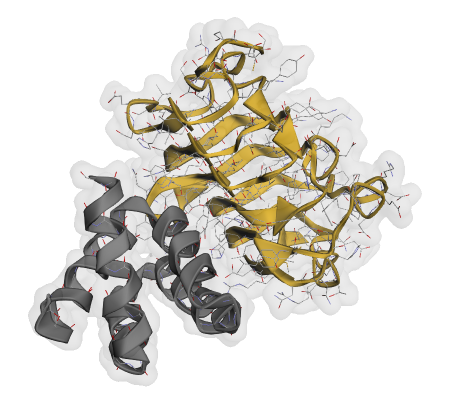
from rf3.inference_engines.rf3 import RF3InferenceEnginefrom rf3.utils.inference import InferenceInput# Initialize RF3 inference engineinference_engine = RF3InferenceEngine(ckpt_path='rf3', verbose=False)# Create input from the MPNN-designed structure (first design)# This re-folds the sequence to validate it adopts the intended structure# 注意这里的输入是mpnn_outputs[0].atom_arrayinput_structure = InferenceInput.from_atom_array(mpnn_outputs[0].atom_array, example_id="example_protein")rf3_outputs = inference_engine.run(inputs=input_structure)# Outputs: dict mapping example_id -> list[RF3Output] (multiple models per input)print(f"Output keys: {rf3_outputs.keys()}")print(f"Number of models for 'example_protein': {len(rf3_outputs['example_protein'])}")
# Extract the top-ranked predictionrf3_output = rf3_outputs["example_protein"][0]summary = rf3_output.summary_confidencesprint(summary)
{'chain_ptm': [0.8, 0.69],'chain_pair_pae_min': [[None, 13.72], [None, None]],'chain_pair_pde_min': [[None, 6.13], [None, None]],'chain_pair_pae': [[None, 21.29], [None, None]],'chain_pair_pde': [[None, 8.47], [None, None]],'overall_plddt': 0.7235,'overall_pde': 6.8157,'overall_pae': 17.7613,'ptm': 0.43220582604408264,'iptm': 0.19254466891288757,'has_clash': False,'ranking_score': 0.2405}
最后一步将RF3预测的结构与原始RFD3生成的骨架进行比较。骨架RMSD值低表明设计的序列很可能折叠成预期的结构(高可设计性)。
from biotite.structure import rmsd, superimposefrom atomworks.constants import PROTEIN_BACKBONE_ATOM_NAMESimport numpy as np# Get structures for comparisonaa_generated = atom_array # Original RFD3 backbone (from Section 1)aa_refolded = rf3_output.atom_array # RF3-predicted structure# Filter to backbone atoms (N, CA, C, O)bb_generated = aa_generated[np.isin(aa_generated.atom_name, PROTEIN_BACKBONE_ATOM_NAMES)]bb_refolded = aa_refolded[np.isin(aa_refolded.atom_name, PROTEIN_BACKBONE_ATOM_NAMES)]# Superimpose structures and calculate RMSDbb_refolded_fitted, _ = superimpose(bb_generated, bb_refolded)rmsd_value = rmsd(bb_generated, bb_refolded_fitted)print(f"Backbone RMSD: {rmsd_value:.2f} A")print(f"\nInterpretation: {'Excellent' if rmsd_value < 1.0 else 'Good' if rmsd_value < 2.0 else 'Moderate'} designability")
Backbone RMSD: 19.03 AInterpretation: Moderate designability
from atomworks.io.utils.io_utils import to_cif_file# Export structures to CIF format for visualization in PyMOL/ChimeraXto_cif_file(aa_generated, "generated.cif")to_cif_file(aa_refolded, "refolded.cif")
from atomworks.io.utils.visualize import viewfrom lightning.fabric import seed_everythingfrom rfd3.engine import RFD3InferenceConfig, RFD3InferenceEnginefrom mpnn.inference_engines.mpnn import MPNNInferenceEnginefrom rf3.inference_engines.rf3 import RF3InferenceEnginefrom rf3.utils.inference import InferenceInputfrom biotite.structure import rmsd, superimposefrom atomworks.constants import PROTEIN_BACKBONE_ATOM_NAMESfrom atomworks.io.utils.io_utils import to_cif_fileimport numpy as npimport osimport json# Set seed for reproducibilityseed_everything(0)# 安全的输出jsondef to_json_safe(obj):import numpy as npif isinstance(obj, dict):return {k: to_json_safe(v) for k, v in obj.items()}elif isinstance(obj, list):return [to_json_safe(v) for v in obj]elif isinstance(obj, tuple):return [to_json_safe(v) for v in obj]elif isinstance(obj, np.ndarray):return obj.tolist()elif isinstance(obj, np.generic):return obj.item()else:return obj# 输出和输入outdir = './outputs'inputs_json = 'protein_binder_design.json'n_batches=2diffusion_batch_size = 2os.makedirs(outdir, exist_ok=True)#rfd3config = RFD3InferenceConfig(diffusion_batch_size=diffusion_batch_size # Generate 2 structures per batch)# Initialize engine and run generationmodel = RFD3InferenceEngine(**config)outputs = model.run(inputs=inputs_json, # 输入我们自己的json文件out_dir=None, # None to return in memory (no file output)n_batches=n_batches, # Generate 1 batch)# Configure per-input inference options# See mpnn.utils.inference.MPNN_PER_INPUT_INFERENCE_DEFAULTS for all optionsinput_configs = [{"batch_size": 2, # Generate 10 sequences per structure"remove_waters": True,"fixed_chains":['B']}]#初始化rf3inference_engine = RF3InferenceEngine(ckpt_path='rf3', verbose=False)all_metrics = []for name in outputs.keys():for n_batche in range(diffusion_batch_size):atom_array = outputs[name][n_batche].atom_arrayos.makedirs(f'{name}_{n_batche}', exist_ok=True)to_cif_file(atom_array, f"{outdir}/{name}_{n_batche}/{name}_{n_batche}_bb_generated.cif")#2. mpnnengine_config = {"model_type": "ligand_mpnn", # or "protein_mpnn" for vanilla ProteinMPNN"is_legacy_weights": True, # Required for now for ligand_mpnn and protein_mpnn"out_directory": f"{outdir}/{name}_{n_batche}", # Return results in memory"write_structures": False,"write_fasta": True}model = MPNNInferenceEngine(**engine_config)mpnn_outputs = model.run(input_dicts=input_configs, atom_arrays=[atom_array])# 3. rf3for nums in range(input_configs[0]['batch_size']):# Create input from the MPNN-designed structure (first design)# This re-folds the sequence to validate it adopts the intended structure# input_structure = InferenceInput.from_atom_array(atom_array, example_id="example_protein")input_structure = InferenceInput.from_atom_array(mpnn_outputs[nums].atom_array,example_id=f"{name}_{n_batche}_seq{nums}")rf3_outputs = inference_engine.run(inputs=input_structure)# Extract the top-ranked predictionrf3_output = rf3_outputs[f"{name}_{n_batche}_seq{nums}"][0]# summary = rf3_output.summary_confidencesraw_summary = rf3_output.summary_confidencessummary = to_json_safe(raw_summary)# 4. Validation and Export# Get structures for comparisonaa_generated = atom_array # Original RFD3 backbone (from Section 1)aa_refolded = rf3_output.atom_array # RF3-predicted structure# Filter to backbone atoms (N, CA, C, O)bb_generated = aa_generated[np.isin(aa_generated.atom_name, PROTEIN_BACKBONE_ATOM_NAMES)]bb_refolded = aa_refolded[np.isin(aa_refolded.atom_name, PROTEIN_BACKBONE_ATOM_NAMES)]# Superimpose structures and calculate RMSDbb_refolded_fitted, _ = superimpose(bb_generated, bb_refolded)rmsd_value = rmsd(bb_generated, bb_refolded_fitted)summary["rmsd_value"] = float(rmsd_value)# print(f"Backbone RMSD: {rmsd_value:.2f} A")# print(f"\nInterpretation: {'Excellent' if rmsd_value < 1.0 else 'Good' if rmsd_value < 2.0 else 'Moderate'} designability")# Export structures to CIF format for visualization in PyMOL/ChimeraXto_cif_file(aa_refolded, f"{outdir}/{name}_{n_batche}/{name}_{n_batche}_{str(nums)}_rf3.cif")summary_record = {"backbone": name,"seq_id": nums,"rmsd": float(rmsd_value),**summary}all_metrics.append(summary_record)summary_path = f'{outdir}/{name}_{n_batche}/summary_seq{nums}.json'with open(summary_path, 'w') as jf:json.dump(summary, jf, indent=4)with open(f"{outdir}/all_metrics.json", "w") as f:json.dump(all_metrics, f, indent=2)
总结
RFdiffusion3的上手难度虽然增加了,但其设计能力也实现了质的飞跃。通过核心的JSON参数文件,我们能够精确引导模型,生成物理合理的全新蛋白质骨架。紧接着,ProteinMPNN为这些“骨架”高效地“赋予血肉”,设计出在能量上稳定的氨基酸序列。最后,RF3作为“终极裁判”,对设计出的“序列-结构对”进行严格评估和验证,并通过RMSD等指标帮助我们筛选出高成功率的候选设计。
这不仅仅是一个技术流程的串联,更是一套从构思想法到可验证设计的完整闭环。通过热点引导、序列优化、结构重折叠与交叉验证,我们极大地提升了从头设计蛋白的成功率与可靠性。
工具的进化带来了更高的自由度和更强的能力,同时也要求我们更深入地理解其原理与参数。希望本文的梳理与实战演示,能为你扫清探索路上的障碍,真正将RFdiffusion3等AI蛋白质设计工具,转化为你手中探索生命奥秘、创造全新功能的得力助手。
未来已来,让我们一起,用代码设计生命。